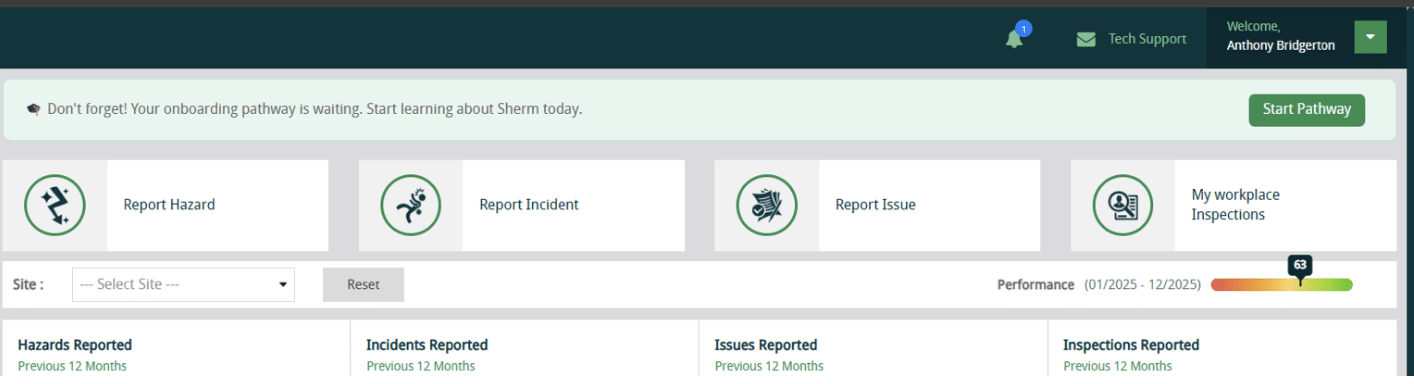
April 2026

Image

Welcome to Sherm Update for April 2026

New Features / Improvements

Learning Centre

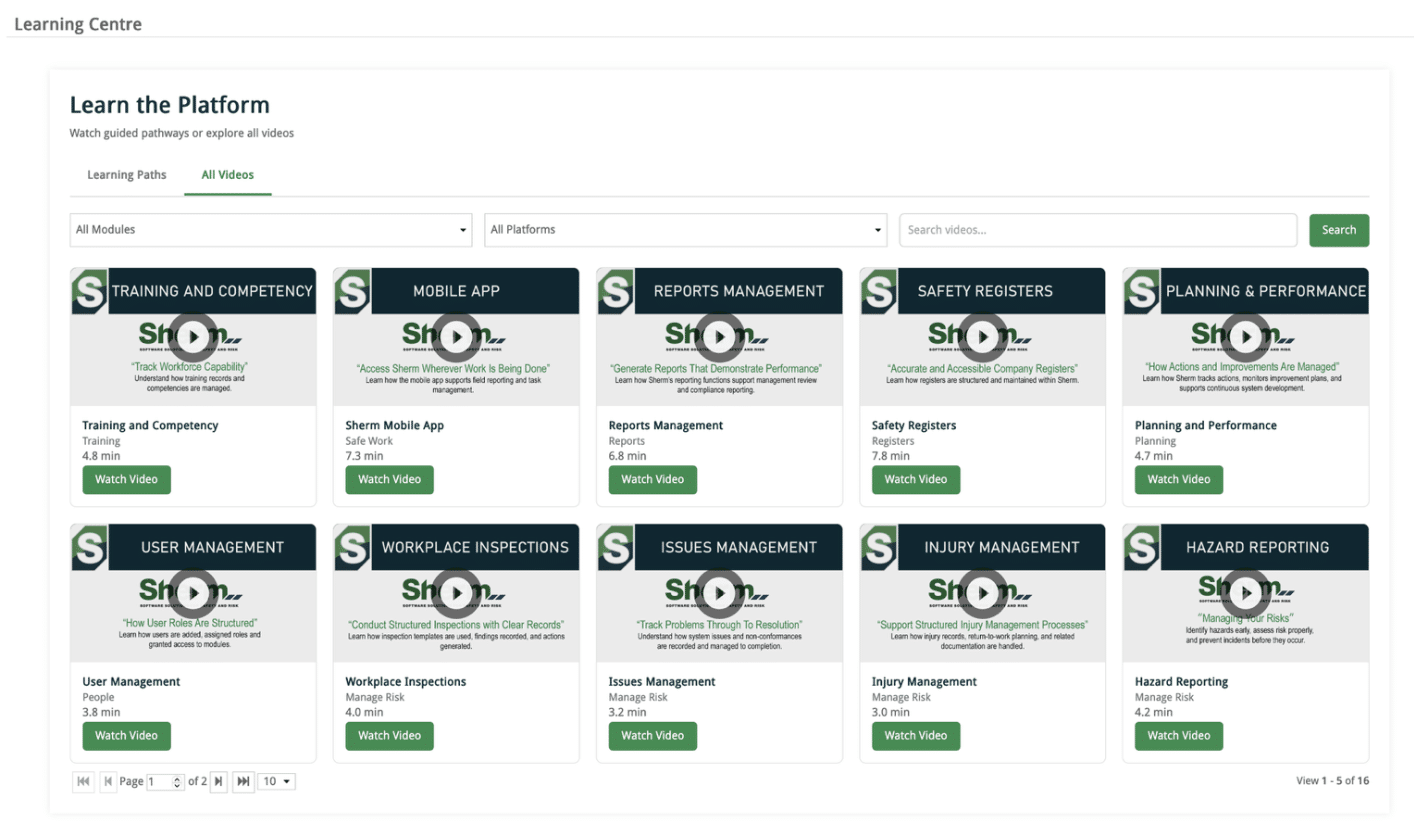
Created a Learning Centre that will host the following:
  1. Learning Pathways: created from selecting videos from our library to support staff learning
  2. Learning Videos: individual videos that can be viewed as and when required by workers
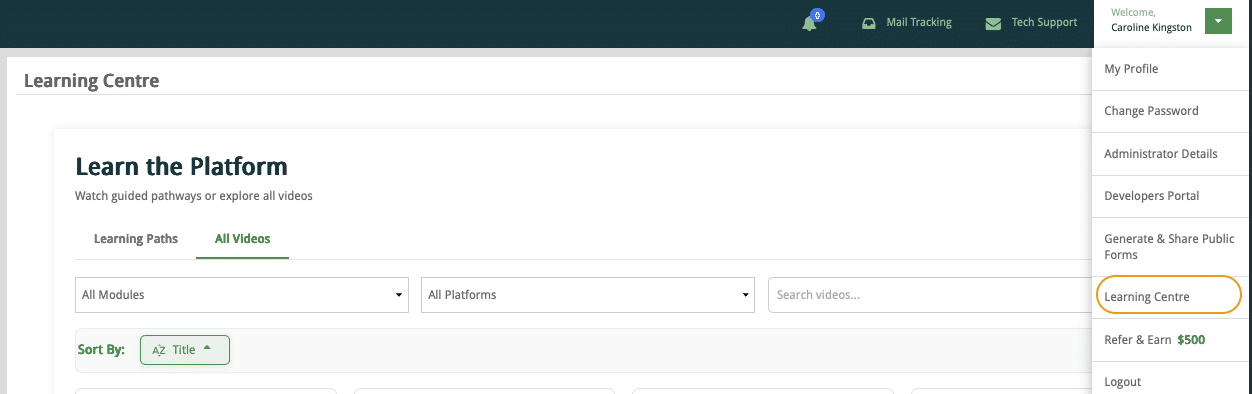
Welcome Learning Centre

Learning Videos

The learning videos are searchable and sortable by module. Over time additional videos will be included, so I welcome your input as to what would help you and your workers.
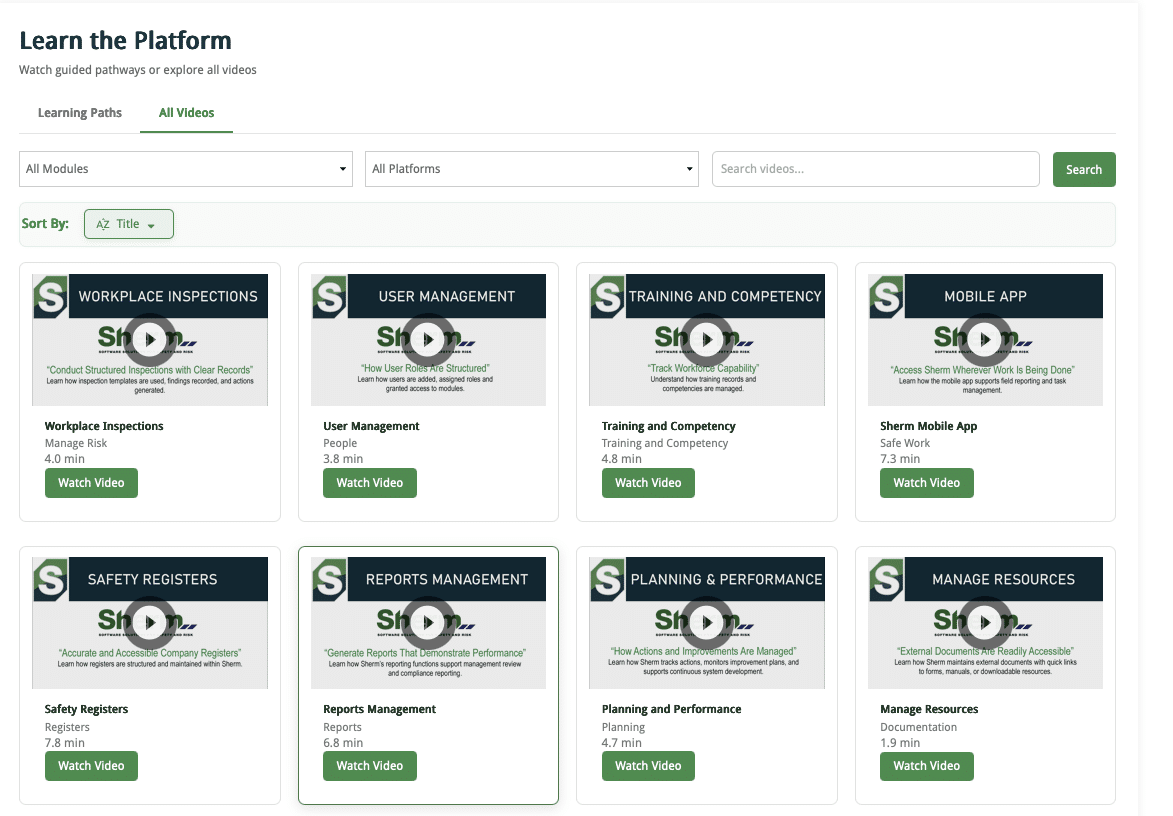
Learning Centre Video

Learning Centre Pathways

Pathways have also been created so you can schedule as required for specific user levels and your expectations in the use of Sherm.
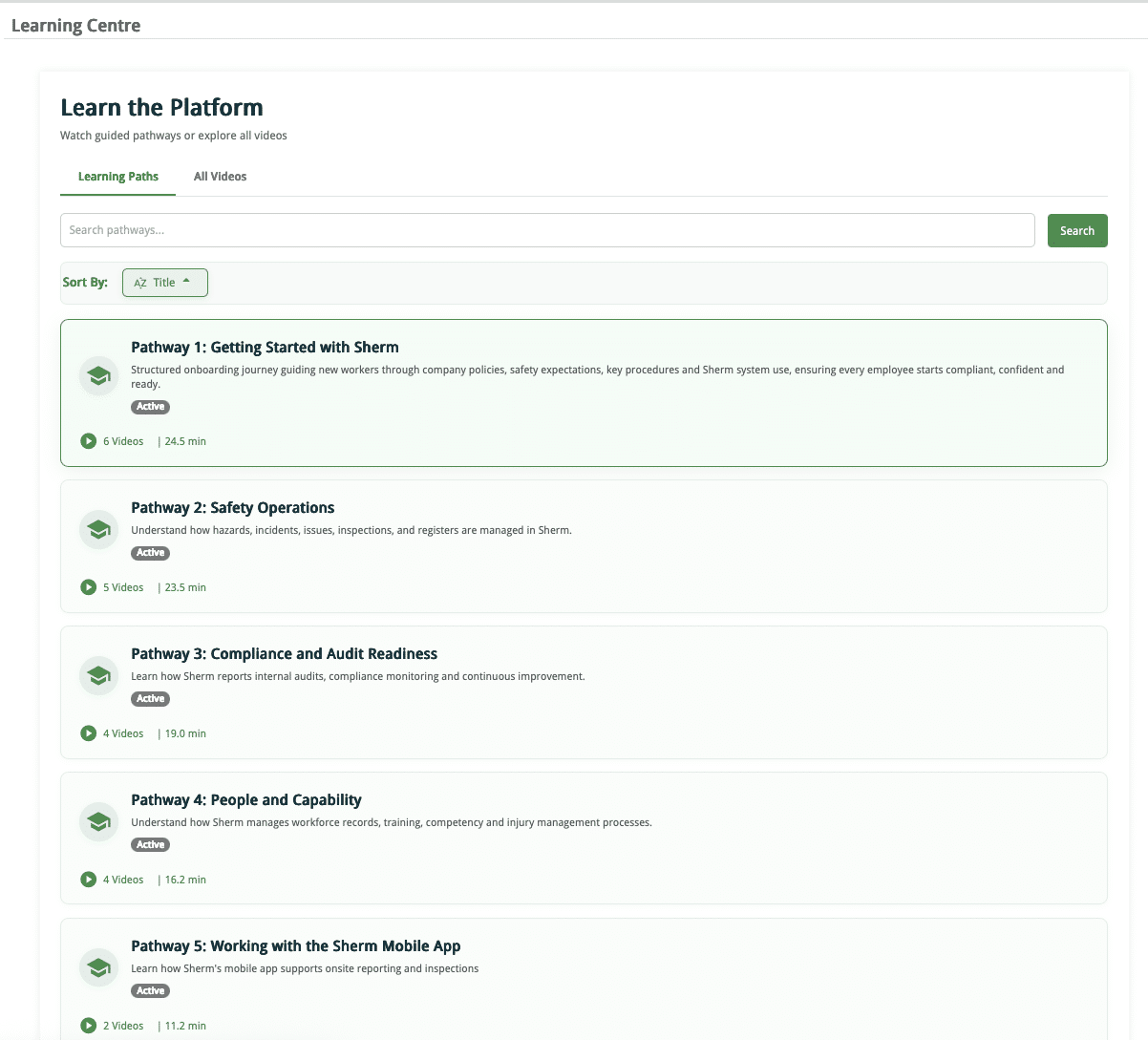
Learning Centre Pathways

Training and Competency

Firstly, we have included an additional TAB – Learning Achievements in Manage Employee to display the Learning Pathways scheduled for workers and the record in their Employee Print Report.
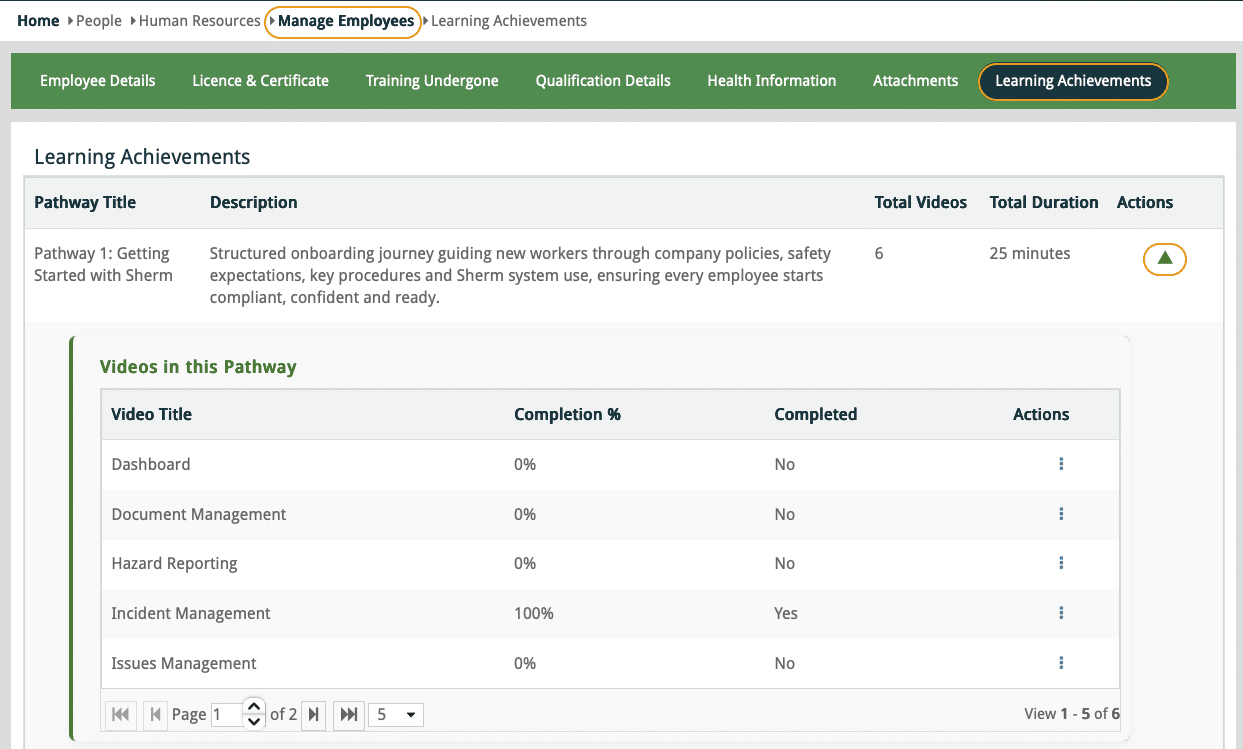
Learning Achievements in Manage Employee

Training Master

The function to include a Learning Pathway or a Training Video from the Learning Centre is provided in the Link tab of the Training Program.
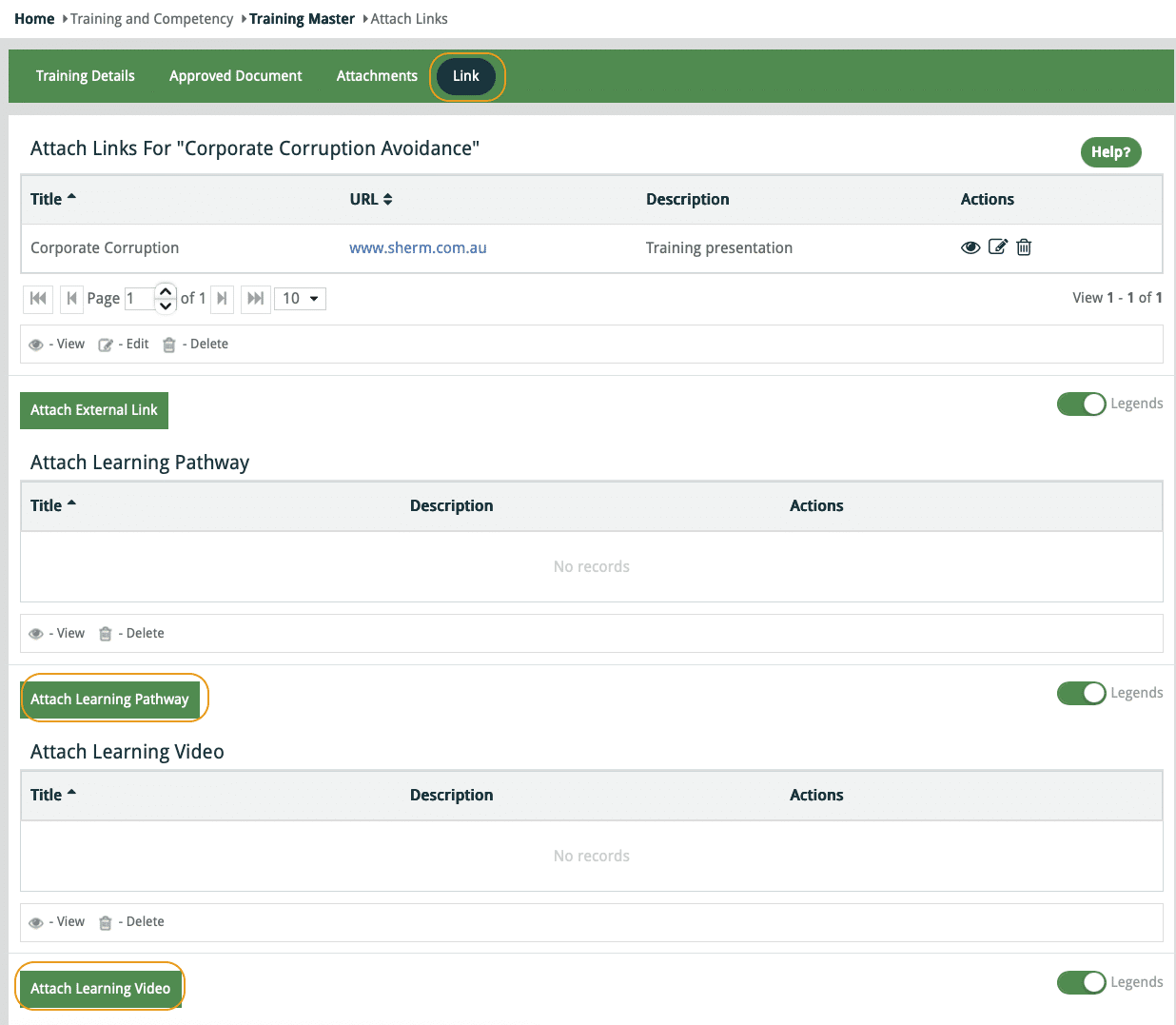
Training Master Attached Pathway Video

My Training / My CAT

We have improved the User Interface here so workers can now access the MyCAT by clicking on the Appear for CAT action button positioned next to the “Notify Organiser of Attendance” button.
The Appear for CAT action button will display when a CAT has been linked to Scheduled Training. This saves the user having to go to MyCAT in both Web and Mobile App.
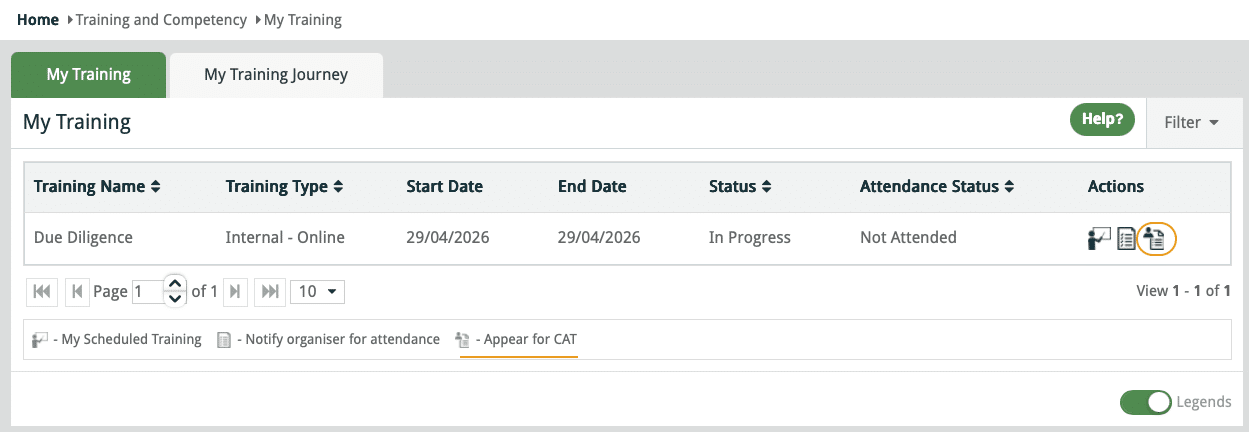
My Training with CAT action button

CAT Reminder Notification Email

If a worker has been scheduled training and CAT, but only completes the Training, a notification will be sent to the worker reminding them to complete the CAT in 1 day.

Worker Acknowledgements

User Notifications

New feature that when a notification is pushed out you can monitor through Acknowledgement Status that will display in the User News and Notification.
Below is a view of post Acknowledgement Status.
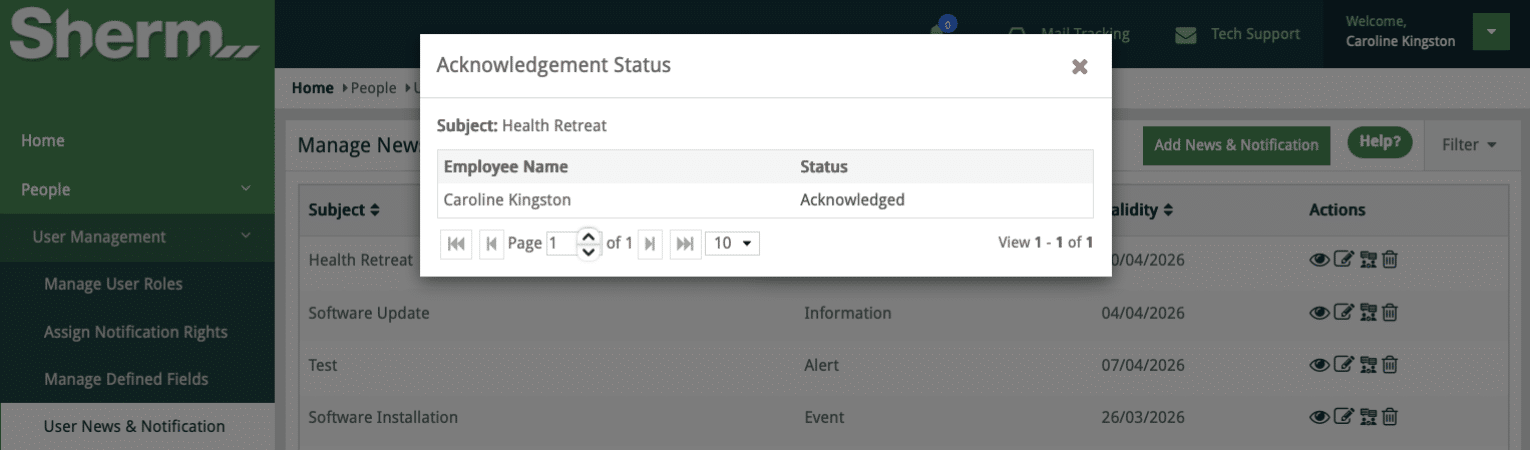
Acknowledgement Status

Approved Documents

Upon approval of a Document that is then emailed to relevant users based upon Site / Department, the email will now require the worker to acknowledge receipt of such document.
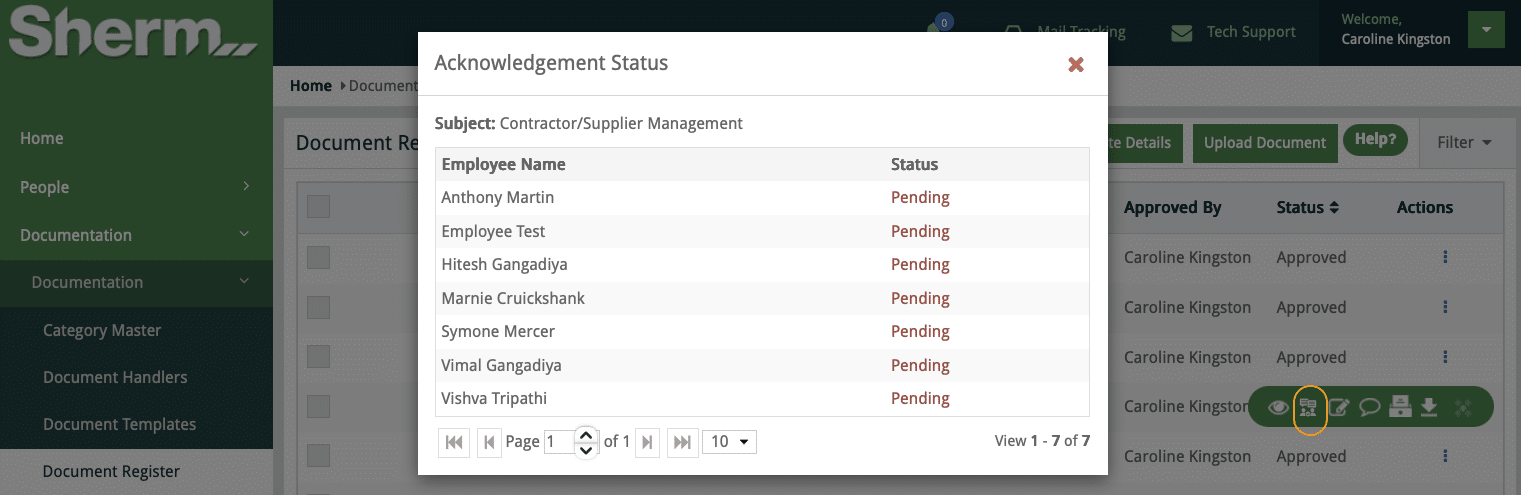
In the Document Register is a new action button View Acknowledgement. Upon clicking, the Status will display for each worker that the document was distributed to.

View Acknowledgement button
Acknowledgement Status
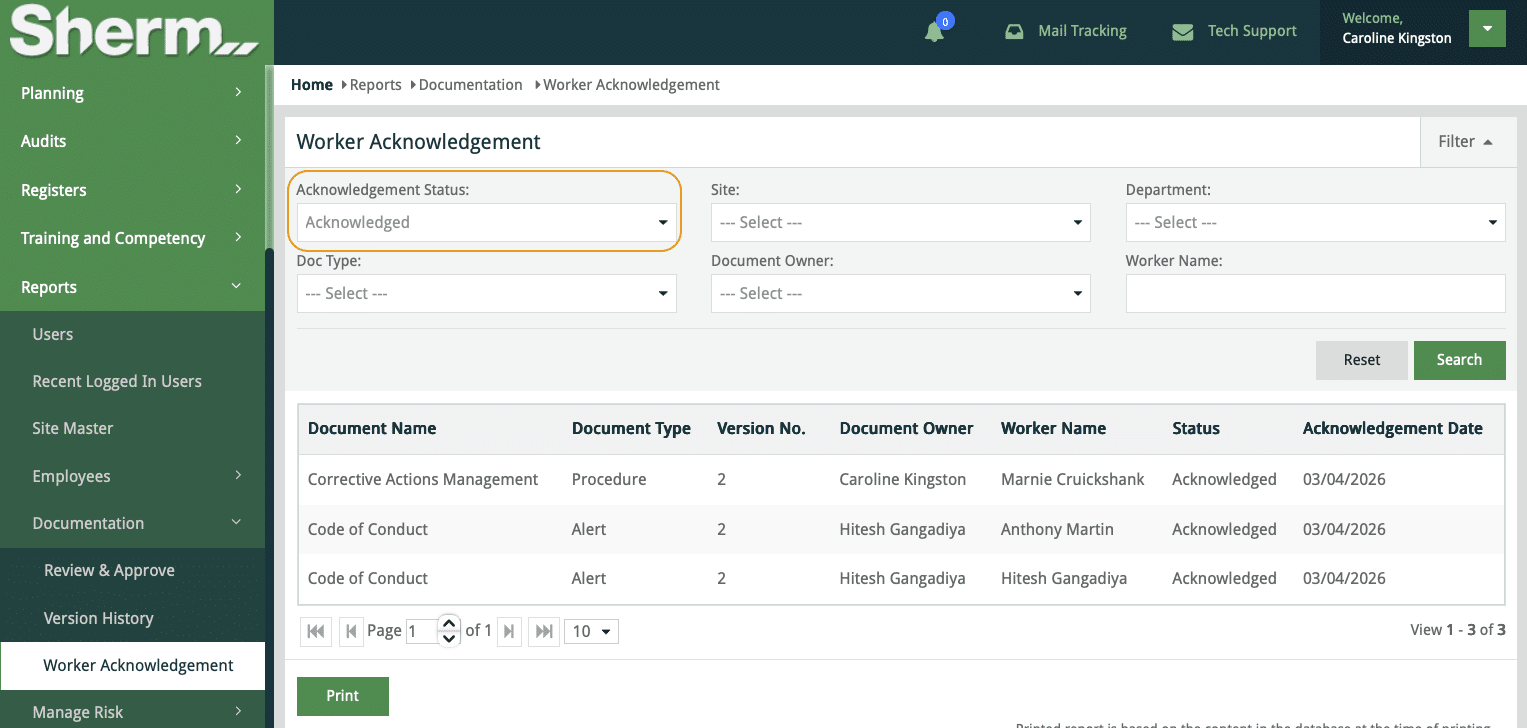
A new Report > Documentation > Worker Acknowledgement has been added that enables a report to be produced based on Acknowledgement Status, Site, Department etc..
Status included:
  • All (both acknowledged and pending)
  • Acknowledged
  • Pending
Worker Acknowledgement Report

Location Master and Sub-Locations

A Location Master is now located in People > Human Resources > Location Master. The Location Master will only affect 4 Modules: Hazard, Incident, Issues and Inspections.
Data will be populated based upon existing data contained within your site that has been generated over time. It would be feasible to review these Locations and make a determination if Sub-Locations are required.
Locations can be sorted by Site, so to add a Sub-Location, click on the + button where you may either use the Add New Sub-Location or Import from Excel.
Note: It is not a requirement to add sub-locations as we have not made this a mandatory field.
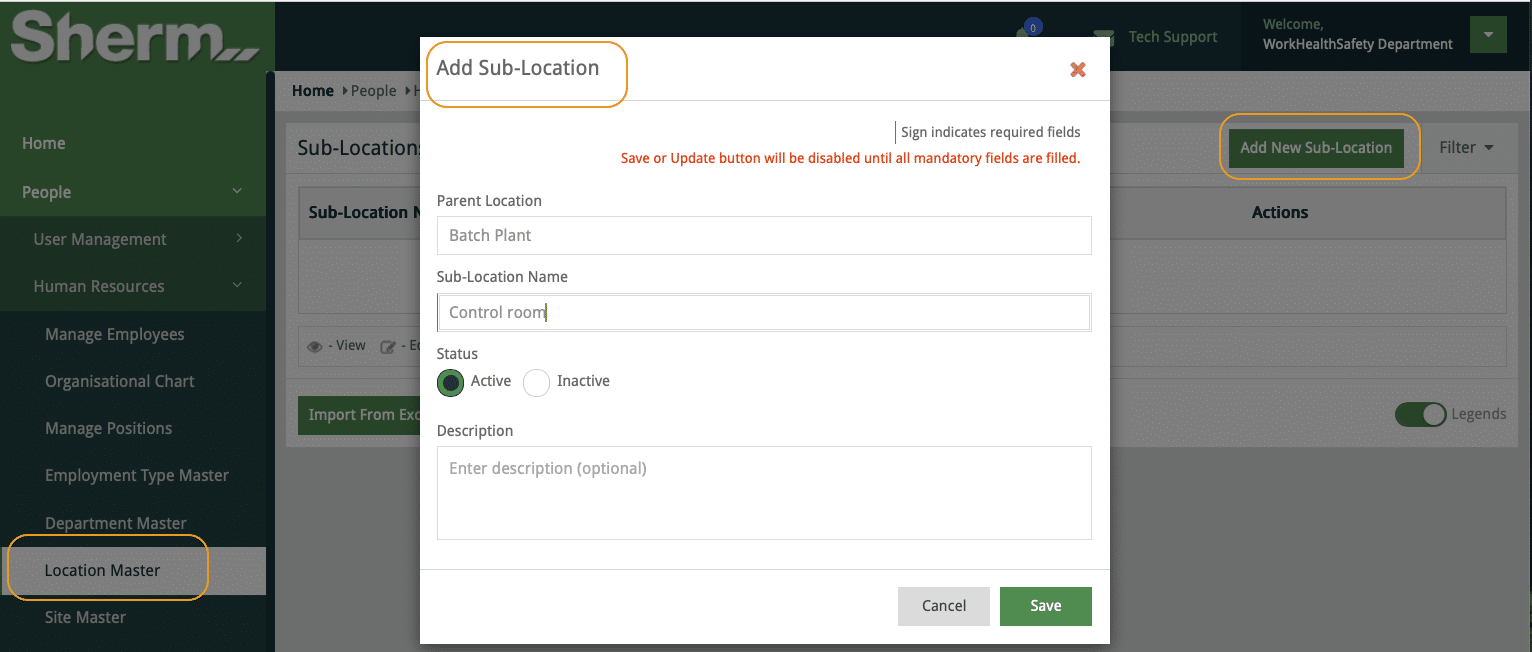
Location and Sub-Location

Fixes and Minor Inclusions

Incident Management > Injury Register

1. Agency of Injury / Illness

  • Biological / physiological agents
  • Internal medical condition.
2. Mechanism of Injury / Illness
  • Medical event / sudden illness
3. Bodily Location of Injury / Illness
  • Internal organs
4. Nature of Injury / Illness
  • Cardiac event (heart attack / myocardial infarction)

Selecting Viewers – Report Hazard

  • Issue resolved to ensure viewers are highlighted from dropdown as user types in name.
  • Fix same issue in Mobile

Manage Audit

  • Increased character limit to 15,000 characters for Executive Summary and Recommendations
  • Fixed the Table of Contents order of display.

Pending New Feature

Employee Performance Review

Currently we are in the review process of the Employee Performance Review. This feature will enable you to conduct structured, evidence-based performance reviews directly within the Sherm platform.
Administrators will be able to configure review templates covering safety performance, role competency, behavioural expectations, and WHS responsibilities. Employees complete self-assessments while managers conduct evaluations, hold review meetings, and finalise assessments with digital acknowledgement.
A key advantage is Sherm’s integration with existing system data — including incidents, hazards, inspections, training records, and corrective actions — providing objective evidence during reviews and strengthening accountability across the organisation.
Sneek preview of our progress
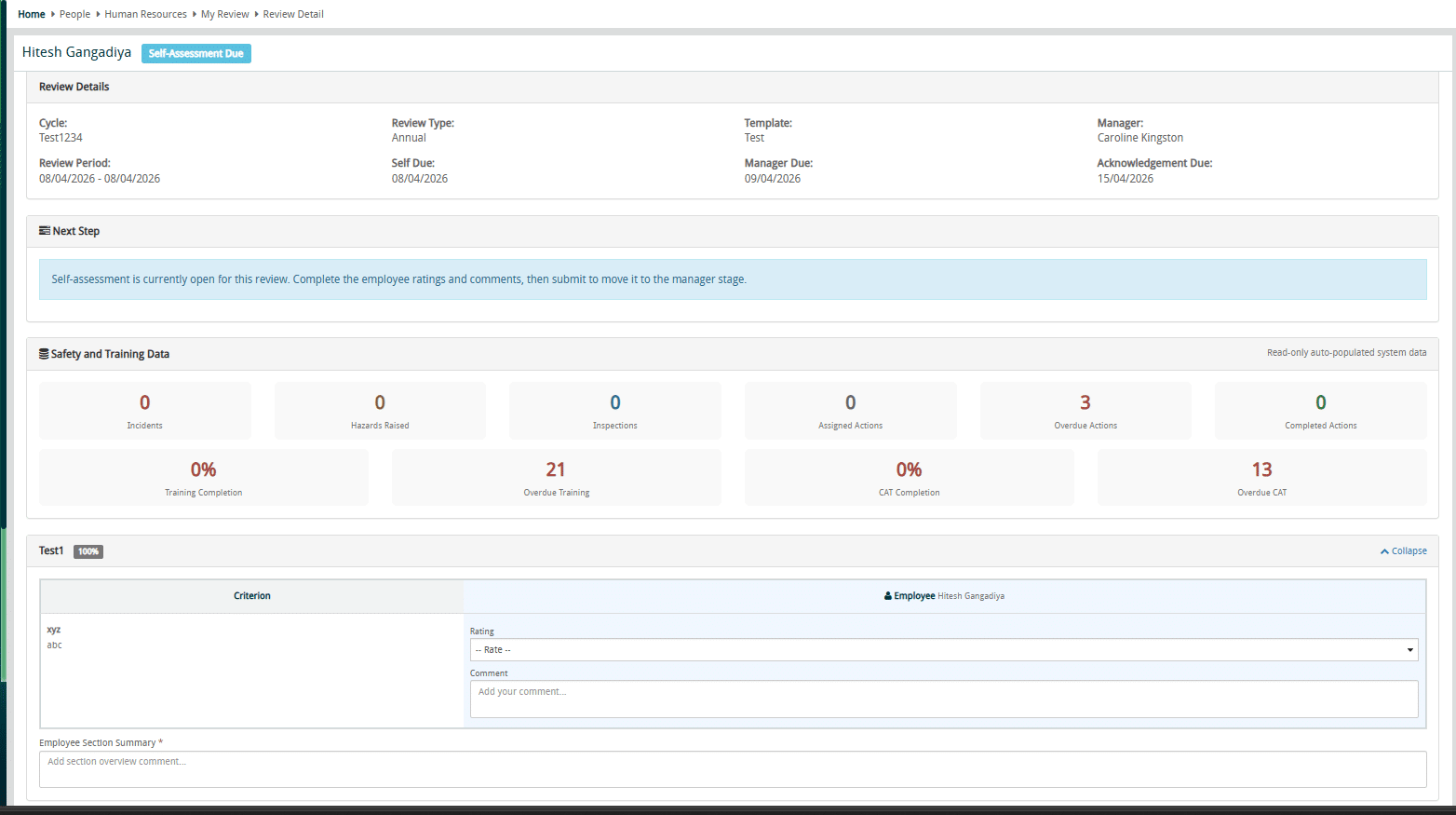
Employee Performance Review

Google Review

Share Your Sherm Experience – Leave a Google Review! 🏆

Your feedback makes a difference! I would love to hear how Sherm has supported your business—whether it’s the ease of use, the mobile app’s convenience, or our support.

⭐ Click HERE to leave a quick Google Review and share your experience with us.

Finally….

It is important to keep your procedures current and up to date and that changes are communicated to your work groups.

Stay happy, healthy, and free 😊

Best Regards,

March 2026

Sherm Software

Welcome to Sherm Update for March 2026

Improvements

Public Forms

  • These are now available for Incident Reporting, Hazard Reporting and Issue Reporting that can be accessed by both internal and external persons of the business. QR Code generation will be available and the QR Codes can be printed as stickers or signs, and/or published on your company website or Intranet.
  • Only accessible to the System Administrator of Sherm.

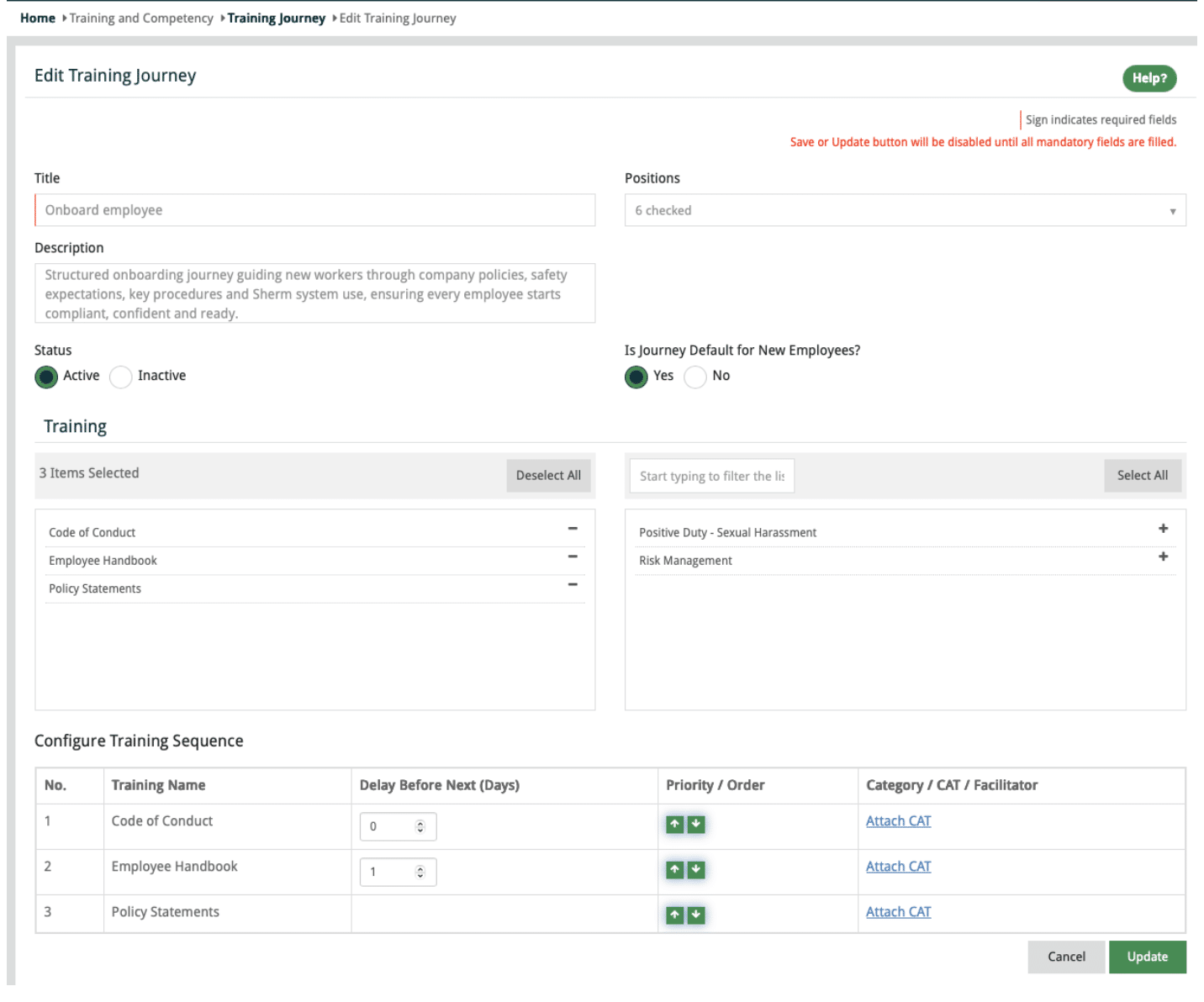
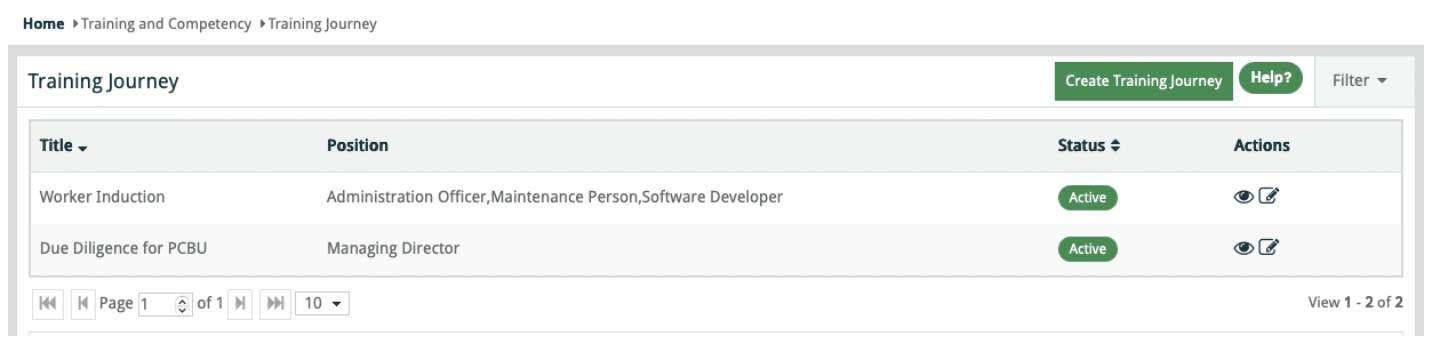
Training Journey

  • Training Journey has been updated to enable the creation of multiple training journeys.
  • Ability to set specific training journeys as a default for new employees that will schedule upon new worker being entered into Sherm.
  • Training journeys that are not selected by default for new workers can be developed based upon a position or multiple positions
  • Multiple position training journey will only display those trainings that are common across those positions.

Training Journey

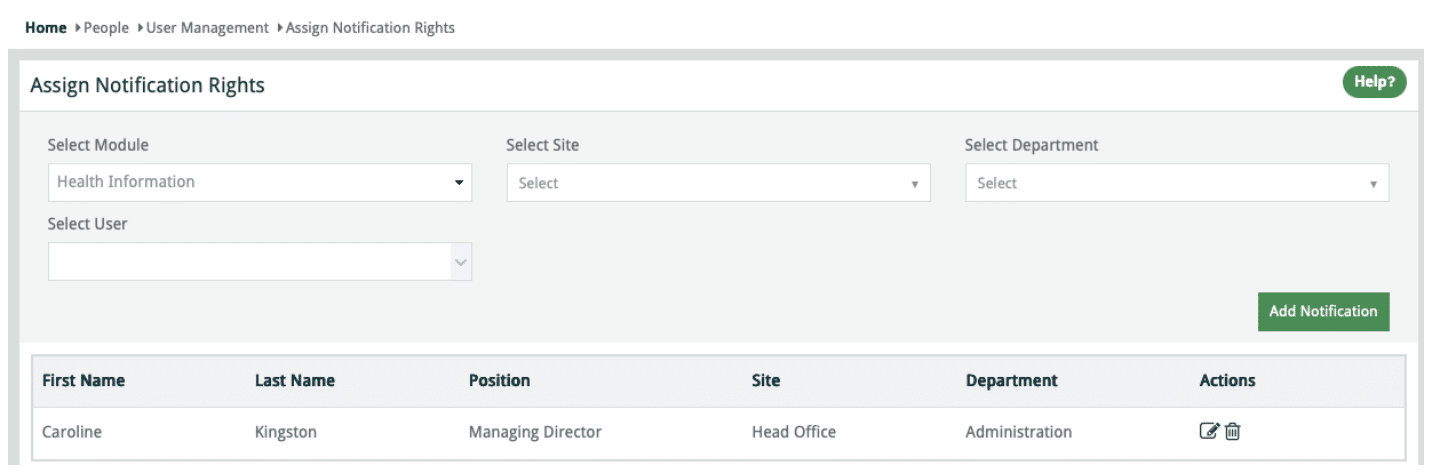
Assign Notification Rights

  • Notification can be set for Health Information will be accessible in next build to production. We will also include “Department” for these notifications.

Assign Notification Rights

Workplace Inspection Module

Category Master 
  • Removed the Category Master to simplify the scheduling process.
  • Inspection Masters are created for the sites that require specific inspections.

Inspection – Form Template Builder

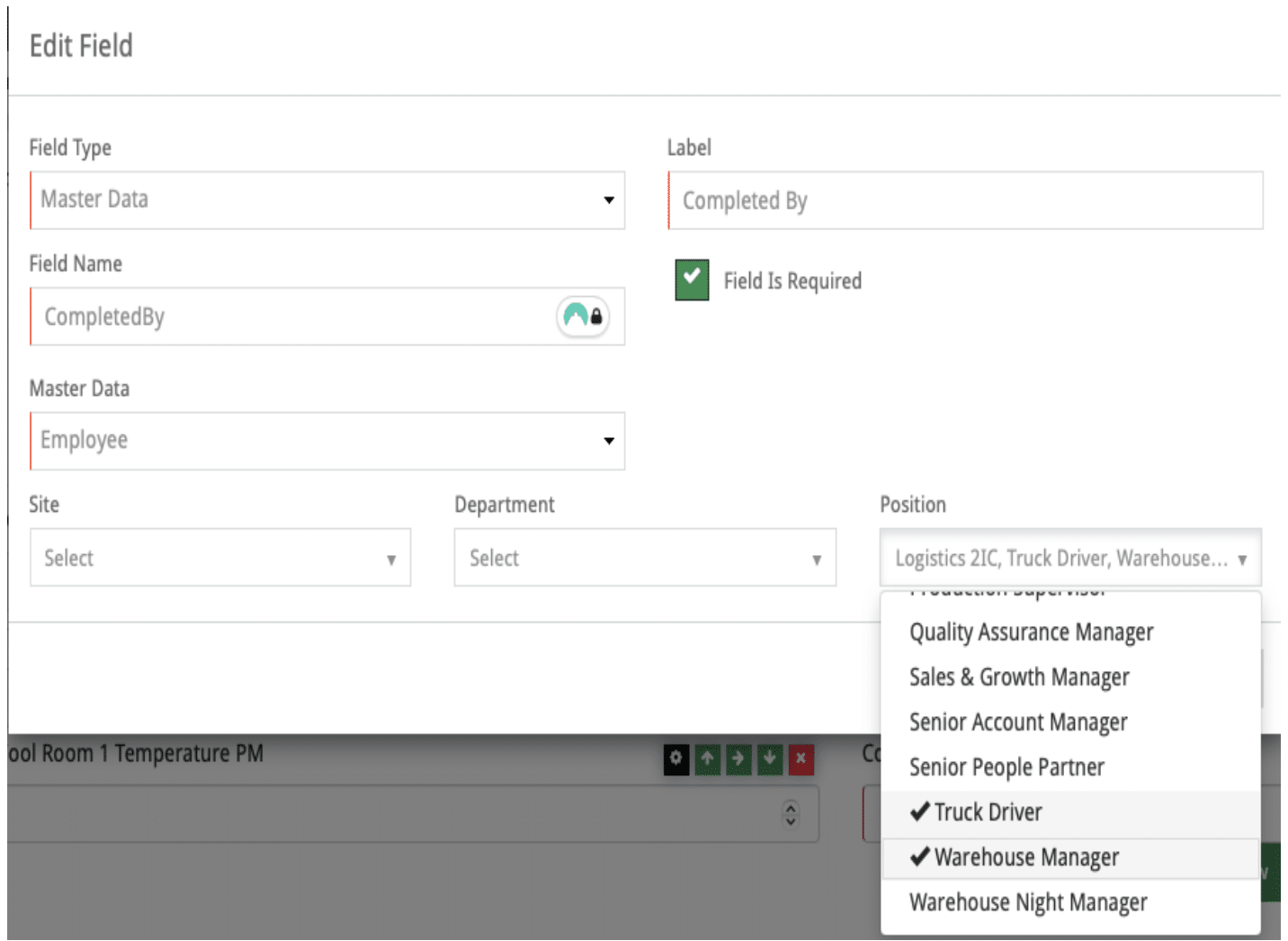
  • Field Type: Master Data for Employee now enables the selection of Site, Department and Position.

Note: multiple sites / departments and Positions can be selected.

Example: Multi Site operation may only want to select specific positions to conduct Vehicle Pre-Starts, then only workers with those assigned positions across the selected sites will display. For this example, you may not even consider the use of Site and just select position/s. Once selected, you can view the Dropdown to check all relevant persons displayed.

Edit Field

Training Journey – Functional Update

Training Journeys are templates used to create and schedule training via the Schedule Training function.

Multiple Training Journeys can be created to suit different roles or position-specific training requirements.

Induction Training Journeys can be assigned to all positions relevant to new employees. When multiple positions are selected, only Training Masters common to all selected positions will be available for inclusion.

Setting a Training Journey as Default for New Employees will automatically schedule the journey when a worker is added to Sherm, with a notification issued to the worker.

You may create as many training journeys as you like.

Training

To ensure you get the most out of this function follow the following instructions:

  1. Click Create Training Journey
  2. Add Title
  3. Select Positions (Note: if you select all positions as I have done with the Worker Induction above, only Training Masters that are common to each Position will display).
  4. Choose either Yes or No to “Is this Journey Default” for new employess
  5. Select Training and then go and link the CAT.
  6. Save

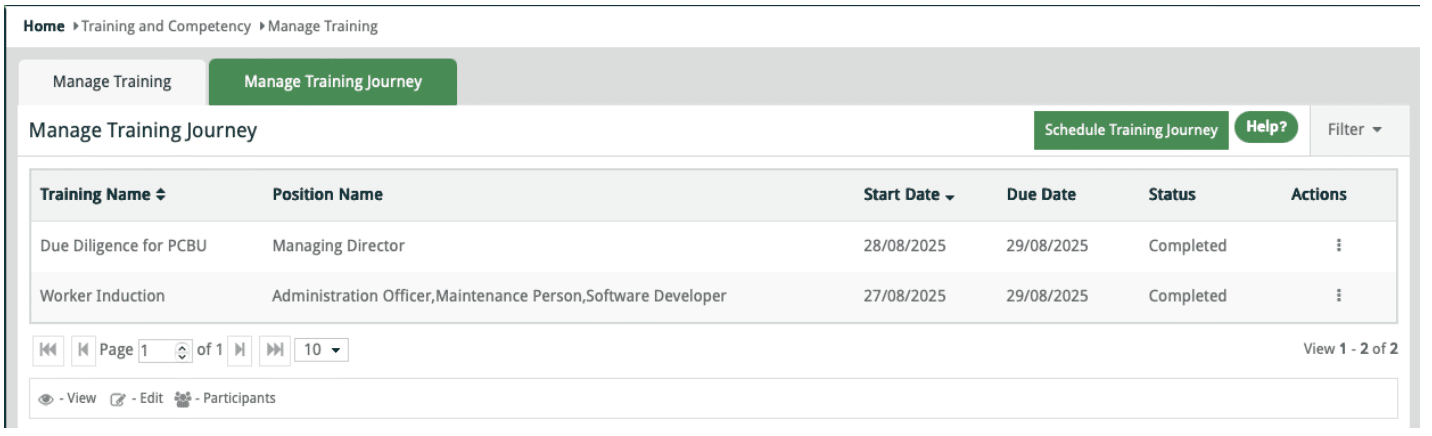
In Training > Schedule Training, you can Schedule Training Journey

Manage Training Journey

CAT Verification

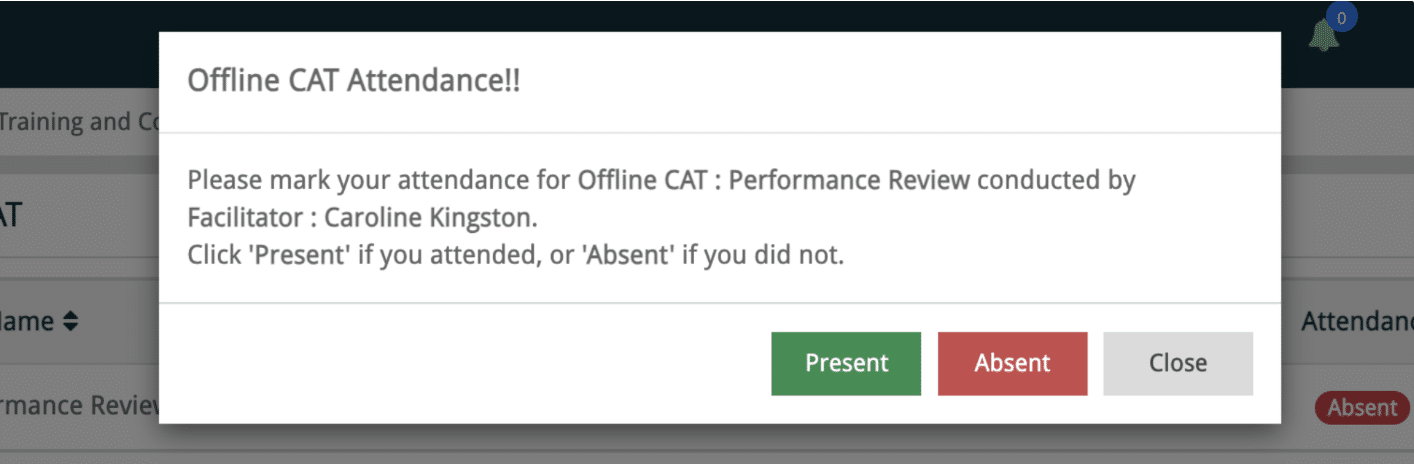
For validity, an email will be sent to the Participant upon the completion of an Offline CAT completed by the Facilitator. This is to ensure that such competency assessment tests are being completed as a one-on-one.
Offline CAT

Fixes Completed

  • UI improvements to the Mobile App released in February.
  • Approved documents from Training Master now display in Scheduled Training in the Mobile App
  • Plant Risk Assessment Save & Submit button now active
  • Sort Training, CAT, Licence and Certificate alphabetically in select and deselect grid in Manage Position screen.
  • Pagination in CAT Master screen resolved
  • Resolved the issue of Inspection Type not displaying in Inspection Schedule Edit Popup.
  • Issue of not being able to delete in Risk & Opporutnity Register
  • Email issue sending to non intended users on adding Incident/Hazard.
  • Email and Dashboard Message for Scheduled Audit
  • Table of Contents pagination in View Audit Report and increase character limits to 15000 in Executive Summary and Recommendations

New Features

  1. Learning Centre

We are working on a Learning Centre in Sherm and it is coming together quite nicely.

The purpose of this is to enable support for your workers in learning Sherm through onboarding which will make your life a bit easier.
Here is a sneaky preview of a pop up message that will display for new workers
Pathway
Below in Learn the Platform, there are selections for Learning Paths and All Videos.
We will also add duration of how long a pathway will take and each individual video.
Additionally, in Manage Employee we will add a New Tab for Learning Records.
Learning Centre
We expect this to be available in the next week or two.
  1. Employee Performance Review

Currently we are in the review process of the Employee Performance Review. This feature will enable organisations to conduct structured, evidence-based performance reviews directly within the Sherm platform.
Administrators will be able to configure review templates covering safety performance, role competency, behavioural expectations, and WHS responsibilities. Employees complete self-assessments while managers conduct evaluations, hold review meetings, and finalise assessments with digital acknowledgement.
A key advantage is Sherm’s integration with existing system data — including incidents, hazards, inspections, training records, and corrective actions — providing objective evidence during reviews and strengthening accountability across the organisation.

Google Review

Share Your Sherm Experience – Leave a Google Review!

Your feedback makes a difference! I would love to hear how Sherm has supported your business—whether it’s the ease of use, the mobile app’s convenience, or our support.

⭐ Click HERE to leave a quick Google Review and share your experience with us.

Finally….

It is important to keep your procedures current and up to date and that changes are communicated to your work groups.

Stay happy, healthy, and free 😊

Best Regards,