
Welcome to Sherm Update for December 2025
Improvements
Dashboard – Performance Indicator

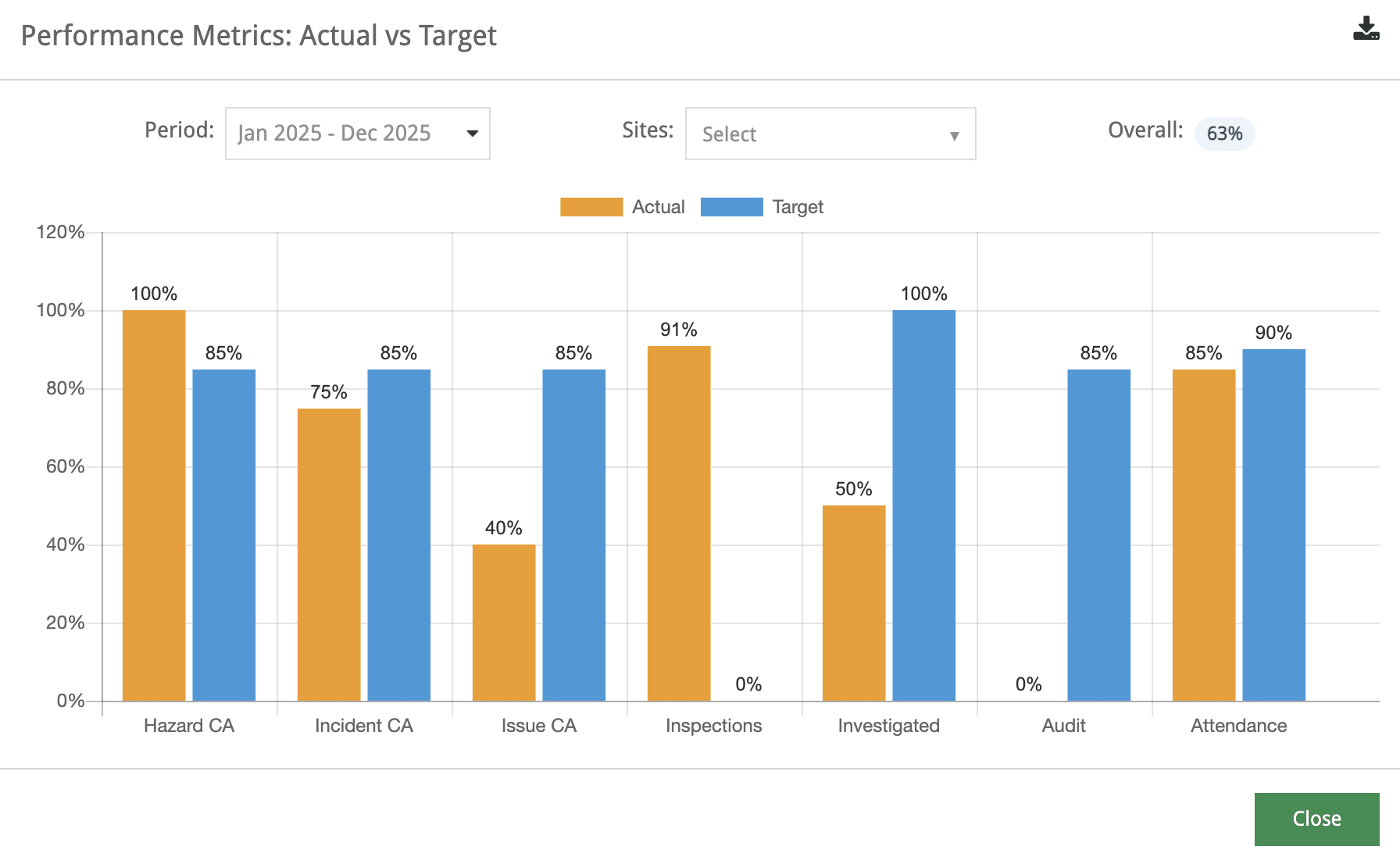
The Dashboard Performance Indicator incorporates the overall performance against the targets set in Planning > Performance relating to % of Hazards, % of Incidents and % of Issues Corrective Actions completed, % of Completed Inspections against the schedule inspections, % of Incidents investigated, % of Audit Scores and meeting attendance.
Upon clicking the Performance a Bar Chart will display which can be downloaded if required.
Note: Period and Sites can be selected from the Dropdown Fields.
Employee Onboarding – User Access Status
Implemented a process to provide better feedback upon registration of a new worker and their access in Sherm.
The listing table now provides the Status of employees. These are explained as follows:
- When a new employee is added, their login status is set to Email Sent as they will receive the Welcome Email to Sherm and their login credentials. Additional emails are sent at this time
- Onboarding Training Requirements – as per Training Journey
- Licence and Certificates – these are mapped from Manage Positions.
- Upon receiving the Welcome Email and they have logged in, the user is required to reset their password and set up a Security Question from the invite mail, the status updates to Onboarded.
- User will then have to log back in after changing their password, so upon successful login, the status becomes Active.
- When employee leaves the organisation, their status will be Inactive.
The Help Feature has been updated to reflect this change. Consider update of internal documents.
Email Notification
If workers are added or imported to Sherm with out an email, upon email being added, the system will send the Onboarding email and Reset Password to the employee, even if the User Role notification is disabled.
Chemical Register
Include a text field to enable website address to be recorded. This has been found to be beneficial for suppliers who provide a link to their Safety Data Sheets via link.
Workplace Inspections
We will be removing the Category Master as it’s function is not warranted and can create confusion when multiple categories are populated. The Inspection Type – Master will include by default All Sites and we are looking at additional linkages to potentially remove the requirement for the Inspection Master.
Feature Rehash
Workplace Inspections
Form Building for Type of Inspection
To ensure you get the most our of Workplace Inspections, ensure the Form Builder template is active.
User Manual Form Builder
To access the Form Builder manual click on the Help button.
Then click on the link User Manual Form Builder.
If you have any questions or need assistance with Form Building, please email [email protected]
Mobile App
If workers are complaining about having to sign-in to Sherm via their Mobile App, have a toolbox talk reminding them they can set up Touch ID / FaceID. All that is required is:
- Log into Mobile App
- Click on the Hamburger that will open up the side Menu bar
- Click on My Account > then Touch ID / Face ID.
For Face ID the settings on the device will need to be enabled, alternatively just use Finger Print.
Regarding the Face ID, see the Data Privacy Policy below.
Legal and Policy Updates
- Privacy Policy see HERE
- Data Privacy Policy HERE
- Sherm Software Terms and Conditions updated in Sherm Portal
Fixes Completed
- Upon completion of CAT, Attendance status has been fixed. New status are Abscent being not attended and Present, having completed.
- Manage Employee – check box for Next of Kin has same address? is holding.
- Mange Employee Filter status was not holding post introduction of new status for Email Sent, Onboarded.
- Training Journey workflow fixed not to flick back to My Training but to the Commence Training Journey page.
- Fixed the display for female profiles in the Admin Panel as they were displaying as male. The Organisational Chart was not affected.
Pipeline Improvements
- Public Forms: these will be available for Incident Reporting, Hazard Reporting and Issue Reporting that can be accessed by both internal and external persons of the business. QR Code generation will be available and the QR Codes can be printed as stickers of signed, and/or published on your company website or Intranet.
- Training Journey: Will make the existing Training Journey location so this is a Master File then moving forward all Training Journey’s will be scheduled through the usual Schedule Training. This will ensure that workers can access their Training via the Mobile App.
- Workplace Inspection Module: We will be removing the Category Master as it’s function is not warranted and can create confusion when multiple categories are populated. The Inspection Type – Master will include by default All Sites and we are looking at additional linkages to potentially remove the requirement for the Inspection Master.
- Assign Notification Rights: request to include Health Information will be accessible in next build to production. We will also include “Department” wise for these notifications.
Please Share Your Sherm Experience – Leave a Google Review! 🏆
Your feedback makes a difference! I would love to hear how Sherm has supported your business—whether it’s the ease of use, the mobile app’s convenience, or our support. Think of it as your Christmas Present to me 🤩
⭐ Click HERE to leave a quick Google Review and share your experience with us if you have not done so already.
Sherm’s Referral Program – A Win-Win for Everyone!
The Referral Program that is accessible via Welcome Dropdown in the Web App and My Account in the Mobile App is now a $500 electronic gift card of their choice!
In these challenging economic times, I’m excited to give back to those who support and recommend Sherm. After all, we all know referrals are the lifeblood of any business.
Christmas New Year Break
The office will be closed from 4pm Tuesday 23 December and will re-open on the Monday 5 January 2026.
Should emergency support be required during this time, please contact me via mobile.
Wishing you, your staff and loved ones a very merry Christmas and look forward to working with you again in the new year!.
Thank you all for your support, suggestions and feedback regarding Sherm. It has been an honour to serve you and provide you with improvements and opportunities to achieve your stated goals.
Stay happy, healthy, and free 🌻
Best Regards,
- The Sherm Team
- Caroline, Marnie, Symone, Hitesh, Nilesh, Shuma and Bronte